

Mphasis – Prismforce Knowledge Base
SYSTEM SETUP:
SMS (CO - CareerOrbit) And RMS (TO - TalentOrbit) are integrated directly with Data Platform (DP). Any IB/OB request is processed via DP. DP has flows integrated with downstream systems on Mphasis side i.e., EBS (Project Data, Bill Rate Data and Allocation Data), HCM (HRMS Data) and their Ripple Hire (RH – ATS system)
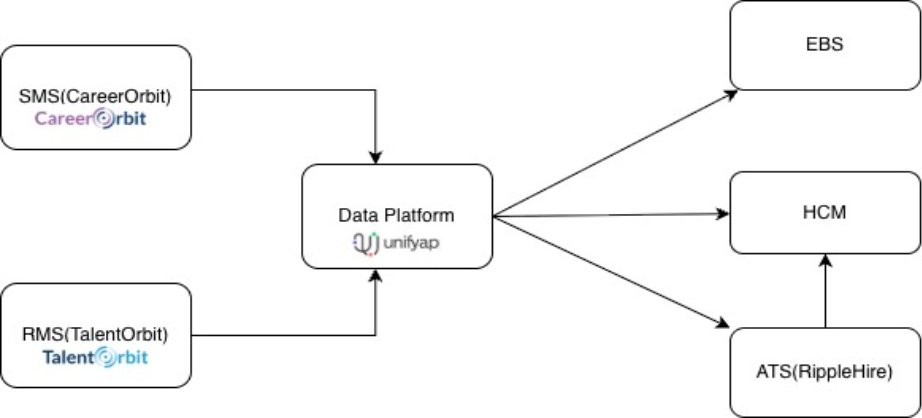
Allocation Workflow
Internal Allocation Flow: Whenever internal Resource is found matching the demand ask, the TFG (Resource Manager) can go ahead and allocate the resource and send a trigger to EBS system through DP system. Even the Requester can select the candidate and take it till the last stage, but actual allocation will be done only by the TFG.
External Direct Allocation Flow: Whenever a Resource joins on ATS, ATS triggers data to DP and to HCM (Emp ID creation). Once DP receives HRMS data, it pushes the data to EBS for allocation. EBS allocates the Resource and trigger the allocation data to RMS (TO - TalentOrbit) via DP.
Common Errors which have been in countered so far:
While working on the platform, there were few which were reported on a day-to-day basi
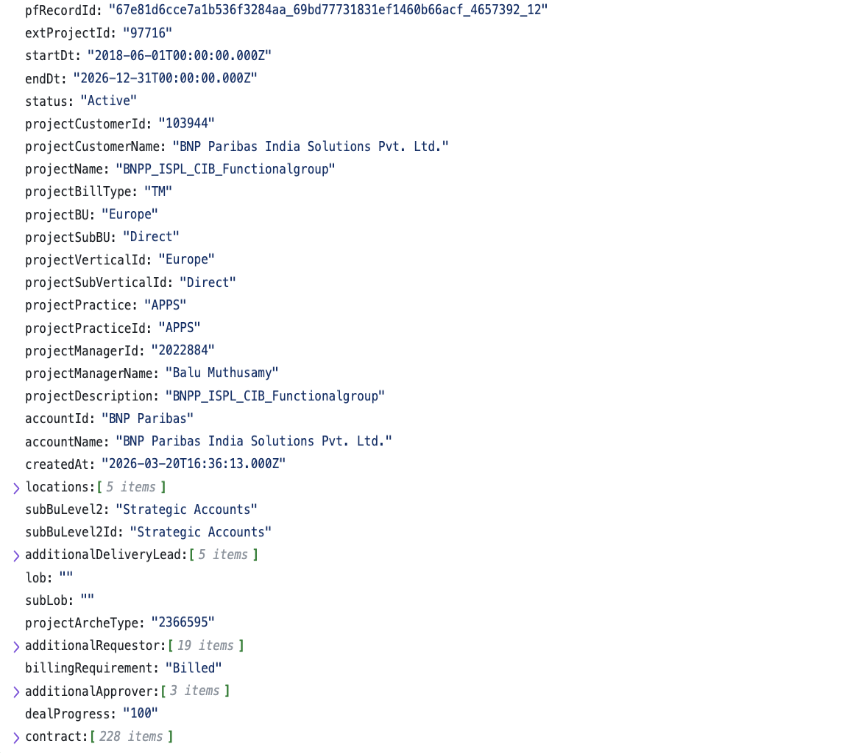
PROJECT NOT VISIBLE
Check Project ID in Project Master API payload.
Verify project status as Active.
Ensure requestor employee ID exists in 'additionalRequestor'.
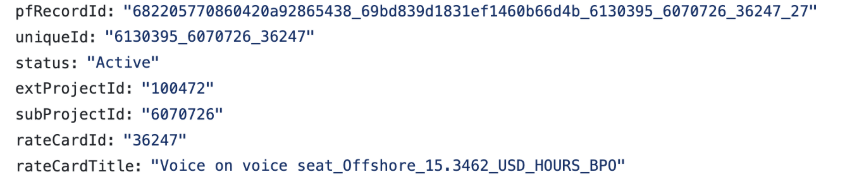
BILL RATE NOT VISIBLE
Ensure the project is active.
Verify user has project access.
Check contract availability for Project Master.
Validate Rate Card API for bill rate and active status.
DEMAND NOT VISIBLE (APPROVAL / ACKNOWLEDGEMENT)
Check if demand exists or is withdrawn.
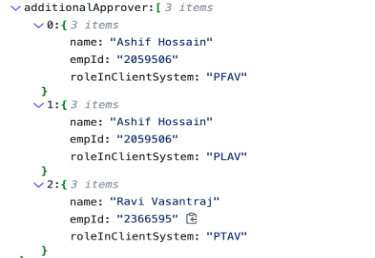
Verify approvers mapping in Project Master.
Ensure correct approver persona login. Below drop down can be found on the login page/homepage on the extreme right side of the page.
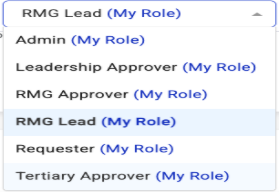
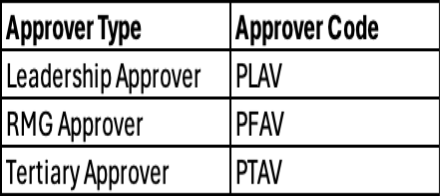
User must be logged in as RMG/Resource Manager for Acknowledgement. The option to choose RMG persona will be available in the same drop-down as approver.
Ensure that all approvals are completed.
Note: All RMGs have all demand access.
JR CREATE / CANCEL ISSUES
Check on the UI for JR Status.
JR APIs are asynchronous.
Verify requests sent from IL.
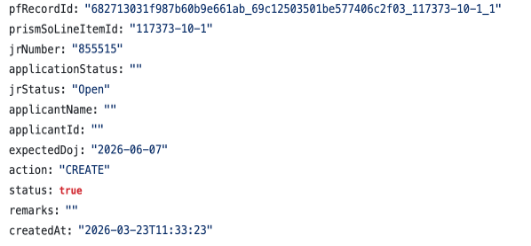
Check JR Update Payload.
jrStatus: OPEN (create), CLOSED (cancel).
Status (ATS) should always be TRUE.
Action: CREATE initially, UPDATE later.
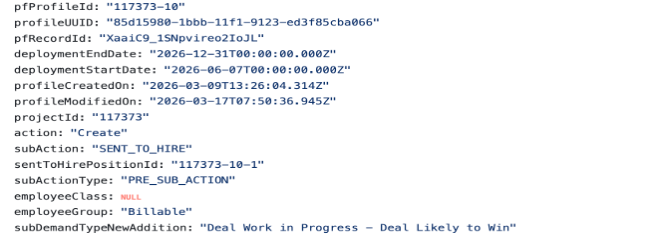
JR Create:
JR Update:
ALLOCATION ISSUES
In case of Internal Allocation, Check for resources in the PALC bucket.
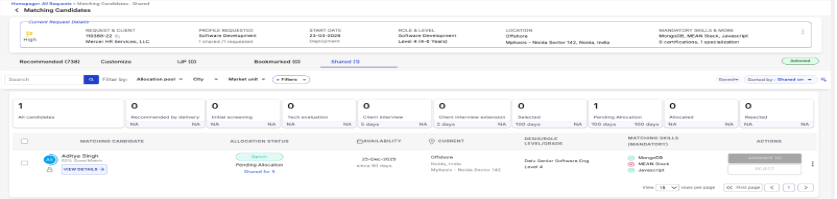
Check for Validate Allocate API response on IL.
Verify the Candidate Movement API payload for the allocation of resources.
For external hiring, resource direct allocation is live. Hence, ensure HRMS data is sent first.
Followed by Resource allocation date should be sent with CandidateType as 'EXTERNAL_HIRE'.
ORG NOT VISIBLE
Check HRMS API records for organizational details.
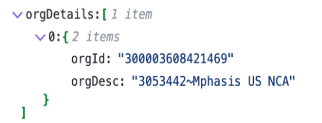
SEND BACK TO INTERNAL
Check JR status in UI.
Validate JR Update payload against cancel payload.
Valid statuses include:
L2 Round, to be offered, Offered, Offer Accepted, Joined, Declined, Revoked.
DESIGNATION NOT VISIBLE -
Check if the designation exists in the designation master of RMS via Inspect and looking for rms-master in API call -> designation.
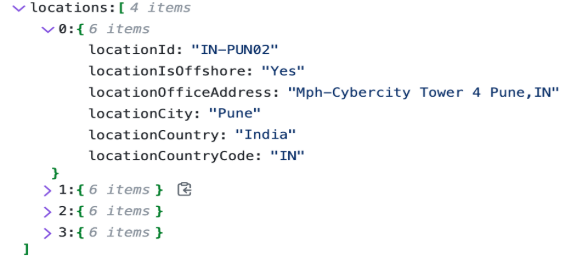
LOCATION NOT VISBLE-
Check if the Location exist in the location master of RMS via Inspect and looking for rms-master in API call -> location.
Check if the same location combination is sent in Project Master Payload.
IJP POSITION NOT VISIBLE-
Check if Demand is posted to IJP or not by checking the IJP Report- Demand View.
Check if the candidate is having match % more than 50 in Global Search by search the Resource and checking for view mappings.
Resource will have visiblity to IJP demands when the Allocation pool is Bench, Future Release, Prohibited Release, Rotation Eligible and Rotation Critical. If the resource has any other pool, IJP positions will not be visible.
Ensure that the candidate has update his/her SMS(CareerOrbit) profile in last 180 days.
EMPLOYEE NOT VISIBLE IN RMS-
Check if Employee is active, is SMS.
Check in Global Search to see if the Employee is visible or not.
Was this article helpful?
That’s Great!
Thank you for your feedback
Sorry! We couldn't be helpful
Thank you for your feedback
Feedback sent
We appreciate your effort and will try to fix the article